• You're one step from joining Home Automation Forum – Smart Home Setups, IoT Devices & Security.
    Create a free account to post, follow threads, and never miss an update.  Sign up free →

Realizing how much power idle devices use

PennyCassiopeia

New member
Joined
Dec 19, 2025
Messages
4
December really opened my eyes to how many things in my house never actually turn off. With more lights, more cooking, and people home more often, I started noticing devices that seem to sip power all day and night without me thinking about it.

I plugged a few things into smart plugs just out of curiosity and the results were more surprising than I expected. Some stuff I assumed was idle was still drawing power nonstop. It’s not a huge amount per device, but when you add everything up it feels different.

Did December make anyone else more aware of how much stuff stays powered on all the time, or was it just me finally paying attention?
 
With everyone home more during the holidays, those small draws stand out fast. I noticed it especially with entertainment stuff and kitchen gadgets. Smart plugs didn’t make me unplug everything, but they did make me more intentional about what stays on overnight.
 
I just got solar panels (and there’s SO LITTLE SUN these days!) and there’s a power monitor app that came with them. I have a refrigerator, freezer, several network switches, microwave (with a clock), range (with a clock), cable DVR, and several other “standby” devices scattered around the house. I also have a handful of outlets with USB chargers built-in to them.

I’m not unplugging anything I need to set a clock on. I’m not unplugging anything with a remote control. Some things need to stay available.
 
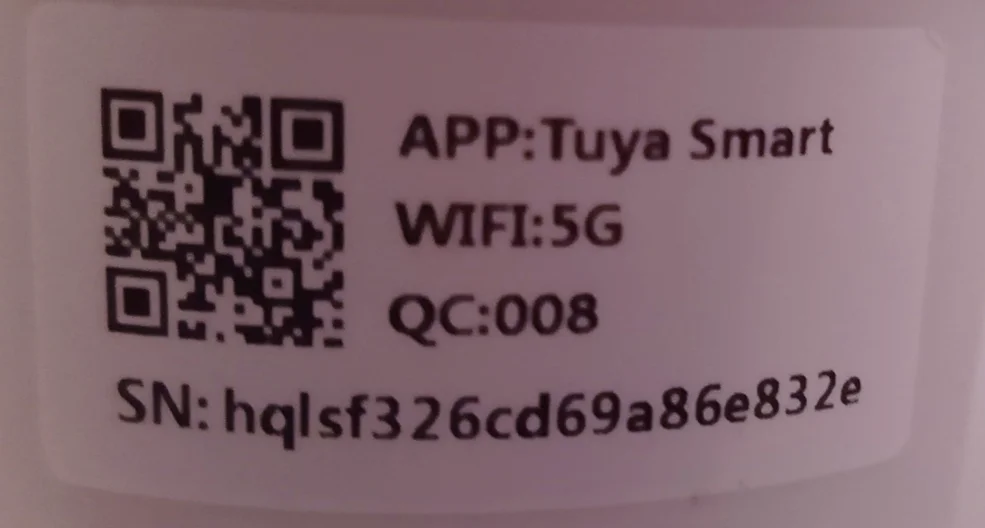
I have the attached camera and the Quick Setup Guide, but I need the "User Manual" to read more about the USE of the camera.
On the camera front there is a brand name: ESCAM

Where can I download this manual ?

Best
Keld in Denmark
1766667381572.webp
 
Last edited:
December really opened my eyes to how many things in my house never actually turn off. With more lights, more cooking, and people home more often, I started noticing devices that seem to sip power all day and night without me thinking about it.

I plugged a few things into smart plugs just out of curiosity and the results were more surprising than I expected. Some stuff I assumed was idle was still drawing power nonstop. It’s not a huge amount per device, but when you add everything up it feels different.

Did December make anyone else more aware of how much stuff stays powered on all the time, or was it just me finally paying attention?
"I plugged a few things into smart plugs just out of curiosity and the results were more surprising than I expected"

I'm not sure what you plugged into smart plugs and I'm not sure what results you were expecting or what results you got or what surprised you.

Here's what I know. I have 47 smart switches and plugs controlling lights, fans, my printer, and a few other things. Each of those smart switches consume between 0.50 watts to 1 watt. All of these smart switches together consume less than 47 watts, 24 hours a day 7 days a week. That is the cost of running the 'smart' network.

I have numerous wall charges that are plugged in and each one of those consume less than 0.5 watts each and they are never switched off.

I don't switch off items that need to stay on all the time like our refrigerator, freezer, Alexa Echo devices, Security system and cameras, cable box, or anything with a clock on it.

I do not unplug or remove the power from my TVs, my router or any other network devices I run in the house including my mesh network.

All my house lighting is LED.

What surprised me was how little power is used by the devices that are controlled by my smart home network. LED lights are typically 5 to 7 watts each. My printer's power consumption drops to less than 5 watts in low power standby.

Even the devices that are not connected to smart switches consume very little power. My TVs go to 0.50 watts in their 'off' state.

So what surprised me was after I had swapped out all the old switches and added smart switches and smart plugs, I found not difference in my power bill.

I consider the automation of my house a convenience feature.
 
I have the attached camera and the Quick Setup Guide, but I need the "User Manual" to read more about the USE of the camera.
On the camera front there is a brand name: ESCAM

Where can I download this manual ?

Best
Keld in DenmarkView attachment 21
Hi Keld. That ESCAM camera label looks like a Tuya Smart based model, WiFi 5G, QC 008, plus that serial number. A lot of these do not have a brand specific manual and instead use a generic Tuya camera manual. Quick check, does your box or the app show an exact model name beyond ESCAM?

Also, since this landed as a reply in an unrelated thread, please start a new post in the Cameras or Security section titled something like “ESCAM Tuya Smart camera user manual QC008”. More folks will see it and help faster.
 
Back
Top